Claude Dispatch
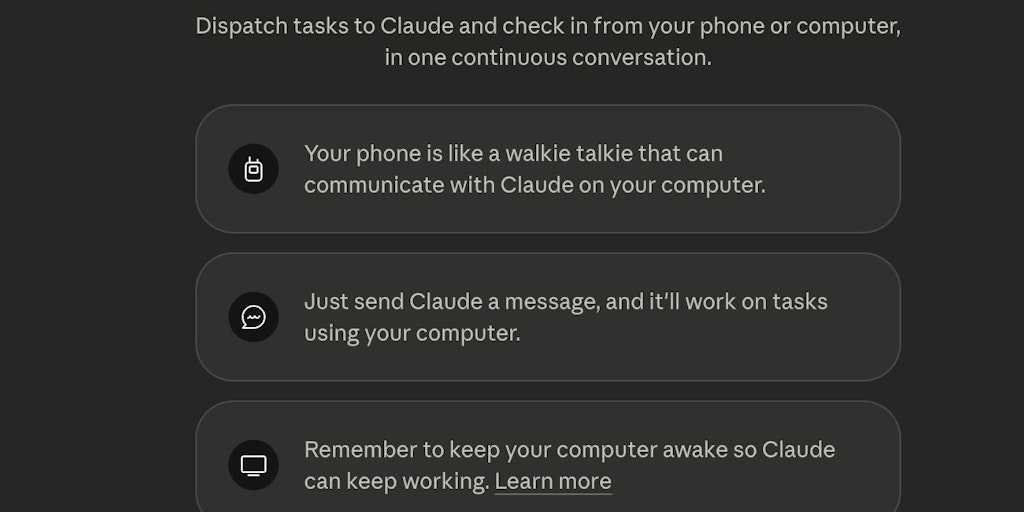
Foto: Product Hunt AI
Dispatch is an application that allows users to send messages to Claude directly from their smartphone, with the AI running on the user's desktop computer. The system has access to files, can browse the internet, generate reports and perform tasks, but everything happens in an isolated environment — the user must approve each action before it is executed. A key feature is maintaining one continuous conversation across devices. The application is a solution for people who want to use Claude's capabilities away from their desk while maintaining control over AI actions. The local nature of data processing means that sensitive information does not reach external servers. The model operates on the principle of so-called sandboxing — Claude cannot independently perform any action without explicit user approval. Dispatch already has 467 followers, suggesting interest from a niche group of users seeking more advanced integration between mobile and desktop. The solution addresses the needs of people working with sensitive data who are concerned about transmitting information to the cloud.
Claude Dispatch is a tool that changes the way we work with AI on a daily basis. Instead of jumping between a browser and a desktop application, you can send messages to Claude directly from your phone, and the assistant will work in the background on your computer. This is not just an ordinary chatbot — it's a system that has access to your files, can browse the web, create reports, and execute tasks. All in a sandbox, locally, with your explicit approval at every step. One continuous conversation window ties all activities together into coherent work.
In a world where we work on multiple devices simultaneously, and AI becomes increasingly integral to our workflows, Dispatch arrives at a crucial moment. Anthropic's platform, the creators of Claude, is clearly hearing the voices of users who want more flexible, controlled access to AI power. The project has already gained 467 followers — the number may seem modest, but in the context of early access to a tool for advanced users, it's a solid base of interested parties.
Dispatch does not compete with ChatGPT or Gemini in the traditional sense. Rather, it's an answer to the question: what if AI were not only intelligent, but actually practical — embedded in your workflow, accessible from anywhere, but never operating without your knowledge and consent?
Read also


Architecture based on trust: sandbox and local control
The foundation of Dispatch is an approach that puts security and privacy on equal footing with functionality. The tool operates in a sandboxed environment — an isolated environment that restricts AI access to only those resources you explicitly share with it. This is not new in the world of IT security, but in the context of consumer AI tools, it's a paradigm shift.
Most AI chatbots operate on a model: you ask, AI answers, data flies to servers. Dispatch tilts the scales toward local processing. The main engine runs on your desktop, which means that sensitive operations — file access, browsing data on your disk — stay at home. Your phone serves only as an interface for sending instructions and receiving results. This solution has deep implications for data security, especially for people working with confidential materials.
The system requires explicit approval for every action Claude wants to perform. If the assistant wants to access a folder, open a file, or send a query to the internet — you see and approve it first. This eliminates the scenario where AI does something in the background without your knowledge. In practice, this means Dispatch is not a tool for those expecting full automation without oversight — but for people who care about control, it's a huge plus.
Integration with real workflow — from mobility to productivity
The key advantage of Dispatch is that it breaks down barriers between devices. You're working on a project on your laptop, you leave home, and you simply send a message from your phone: "Claude, prepare a summary of that document that needs to be ready by 3 PM". The assistant works on your desktop in the background, and you get a notification when the task is complete.
This is particularly valuable for several categories of users. For freelancers and consultants who work on multiple projects simultaneously — they can delegate text tasks, data analysis, or report preparation without leaving a meeting or client. For researchers and analysts who work with large datasets locally — Dispatch offers access to AI without the risk of data leaks to third-party servers. For content creators — they can send an idea from their phone, and Claude works in the background, gathering information, organizing materials, preparing a draft.
One of the most interesting features is One Persistent Conversation — one continuous conversation window that ties all activities together. This means context doesn't get lost between tasks. Claude remembers what it did earlier, what the assumptions were, what the decisions were. This is the opposite of the fragmentation we experience with traditional chatbots, where each new session is a clean slate.
Practical capabilities: from browsing to task execution
Dispatch is equipped with a set of tools that go beyond the capabilities of ordinary chat. Claude can browse the internet — retrieve information from the web, read articles, check real-time data. It can work with files on your computer — open documents, spreadsheets, images, analyze their content, edit them. It can build reports — collect data from various sources, organize it, format it into readable documents.
But that's not all. The system can execute tasks — actual actions on your computer. In theory, this could mean everything from running scripts to managing applications. In practice, due to the approval model, every action is controlled and transparent.
For Polish users, this opens interesting possibilities. You work with documents in Polish? Claude handles Polish perfectly, can analyze texts, create summaries, translate. Do you need to collect data from Polish websites? Dispatch can do it. Need a report in Polish formatting convention? No problem.
Security model in practice: where Dispatch stands out
In an era where every article about AI contains the words "security" and "privacy," Dispatch actually does something concrete. This is not marketing — it's a real system architecture.
Let's compare it to alternatives. OpenAI GPT-4 with browsing — data passes through OpenAI servers, even if you're browsing a site. Google Gemini — Google has access to the context of your queries. Microsoft Copilot — Microsoft collects telemetry. Dispatch, with its local architecture, doesn't have access to your data by default. You decide what Claude can see.
Of course, this approach has trade-offs. You can't rely on the cloud to scale computing power. If you want Claude to work on a huge dataset, your computer will work hard. But for most everyday tasks — document analysis, report preparation, web browsing — this is not a problem.
Ecosystem and integrations: where Dispatch fits in
Dispatch positions itself in the category of AI Workflow Automation — alongside tools like Make, Zapier, or n8n, but with a key difference: instead of connecting external APIs, it connects Claude to your local system.
The ecosystem around this type of tool is growing rapidly. These are no longer just chatbots, but entire automation platforms. Dispatch fits into this trend, but with an emphasis on security and control. For comparison, Make or Zapier require you to connect your accounts and API keys — which means these platforms have access to your data. Dispatch doesn't need to.
The question everyone should ask themselves: do I want to be dependent on the cloud, or do I prefer to have control locally? For many professionals, the answer is obvious. For others who seek maximum convenience and don't worry about data privacy, Dispatch may be too restrictive.
Mobile interface: design for real-world use
The Dispatch mobile app is not just a frontend to a chatbot. It's an interface designed for mobility, where every second counts. You send instructions, get progress notifications, approve actions — all without leaving the app.
The interface is simple but functional. No unnecessary animations or complicated menus. Just: message, send, wait for result. For users accustomed to ChatGPT or Claude.ai, this might be a shock — lacking that "conversational" feel of interaction. But this is a deliberate design decision. Dispatch is not meant to be entertainment — it's meant to be a tool.
One thing worth emphasizing: the mobile app is a complement, not the main interface. The main work happens on the desktop, where Claude has access to resources. Your phone is a remote control for that work. This changes perspective — you're not waiting for an AI response on your phone, you're waiting for a notification that the task on your desktop is complete.
Development prospects and competition on the horizon
Dispatch is still in early access, but you can already see where it's heading. Anthropic is investing in tooling — developer tools that allow integrating Claude with existing systems. Dispatch is a natural extension of this strategy.
Competition is not sleeping. OpenAI is working on its own automation tools. Google DeepMind is developing Gemini. But none of them put such emphasis on local control and security. This is a niche that Anthropic chose consciously — and it could be their competitive advantage.
For the Polish tech market, Dispatch represents an interesting trend: AI tools that treat security and privacy as a feature, not an afterthought. In Poland, where privacy awareness is growing and GDPR is a business reality, such an approach makes sense. Enterprises working with sensitive data — law firms, medical companies, accounting offices — may find in Dispatch a solution that actually meets regulatory requirements.
Ultimately, Dispatch is an answer to a question more and more people are asking themselves: can I have AI that is powerful but doesn't need access to everything? The answer that Dispatch gives is: yes, and it might even be better for productivity. Because when you know that AI is working in a sandbox, under your control, you can focus on actual work instead of worrying about what's happening in the cloud.
More from Tech


Related Articles

After court loss, RFK Jr. gives himself more power over CDC vaccine panel
Apr 6
Steven Spielberg Still Wants to Make a Horror Film ‘Someday’
Apr 6New Jersey has no right to ban Kalshi's prediction market, US appeals court rules
Apr 6