Claude Double Checker
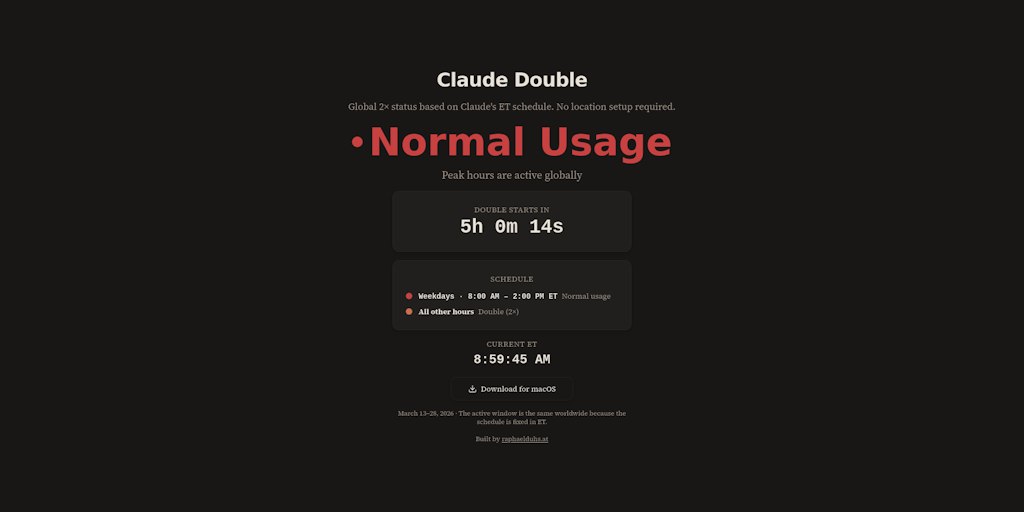
Foto: Product Hunt AI
A creator has developed a tool for Claude Code users who have access to a special 2× resource usage window. Claude Double Checker is a free macOS application that displays the status of this window directly in the system menu bar — eliminating the need to constantly check when the window is active and how much longer it lasts. The tool solves a practical problem: Claude Code users often lose track of when they can fully utilize the model's increased performance. The application shows exactly when it's worth increasing work intensity and when to step back from more resource-intensive tasks. Claude Double Checker is available for free download at double.raphaelduhs.at. Though it's a small tool, it provides a practical solution for programmers and developers who regularly use Claude Code and want to maximize their work efficiency within available limits.
When you work intensively with Claude Code, one of the biggest advantages is access to the doubled usage window — a mechanism that temporarily increases query limits for developers. The problem is that tracking when this feature is active, how much longer it will be available, and when it will turn off is incredibly annoying. You have to constantly switch between the application and the web interface to check the status. This is exactly what Claude Double Checker solves — a minimalist macOS application that displays the status of this usage window directly in the system menu bar.
The tool, which just landed on Product Hunt, is an example of how a simple problem can inspire the creation of a useful solution. Its creator, Raphael Duhs, spotted the inefficiency in the daily workflow of developers using Claude Code and decided to eliminate it. In a world where every second counts for developers, an application like this might seem trivial — but trivial things add up to real productivity.
What's interesting about Claude Double Checker is not just the functionality, but the philosophy behind it. The tool doesn't try to be everything for everyone. Instead, it focuses on one specific problem and solves it elegantly. In times when every application wants to have ten new features, such an approach is a refreshing change.
Read also


How the doubled usage window works in Claude Code
Before we understand the value of Claude Double Checker, it's worth explaining exactly what the 2× usage window in Claude Code is. It's a feature introduced by Anthropic that temporarily increases query limits for users working on coding. Instead of the standard limit, developers can send twice as many queries in a specific time period.
This mechanism is not permanent — it activates for a specified time and then expires. The duration depends on the subscription plan and current usage. For active developers, this makes a huge difference, especially when working on complex projects requiring many iterations. The ability to send twice as many queries means faster iterations, better ability to experiment, and ultimately faster code delivery.
The problem is that Anthropic doesn't integrate this status in any simple way into the operating system. Users have to regularly go back to the web interface to check if the window is still active. This interrupts workflow and requires additional clicks. For a programmer who wants to maximize efficiency, it's an irritating source of distraction.
The macOS menu bar as a new information hub
Claude Double Checker places the information about the doubled usage window status exactly where it should be — in the macOS menu bar. This is a place that every Mac user has always in view, next to the clock, battery level, and other system indicators. The application displays not only whether the window is active, but also exactly how much time remains until it expires.
This location is not accidental. The macOS menu bar is a space that users scan with their eyes thousands of times a day. Placing information there means that a programmer can glance at the status without any additional action. No need to open the application, no need to switch between windows — the answer is there, always available.
It's worth noting that the macOS menu bar was traditionally reserved for system indicators and system applications. In recent years, however, the menu bar application ecosystem has developed significantly. Tools like Bartender, Timing, and Paw have shown that developers can create quite advanced applications in this form. Claude Double Checker follows this path, though with a more precise, narrower goal.
Minimalism as a design strategy
Interestingly, Claude Double Checker doesn't try to add additional features. It doesn't offer statistics, doesn't integrate with other tools, has no advanced configurations. It's an application that does one thing and does it well. In a world where every application wants to be a "platform," such an approach is rare and admirable.
This minimalism strategy has concrete advantages. First, the application is lightweight — it won't burden the processor or Mac's battery. Second, it's reliable — less code means fewer places for bugs. Third, it's fast in operation and simple to use — there's no learning curve, no complex menus.
For comparison, many applications on Product Hunt try to be a comprehensive solution for an entire category. Claude Double Checker does something different — it solves a very specific problem for a very specific group of users. This approach reminds us of the spirit of the early days of the App Store, when applications were tools, not platforms.
Integration with Claude Code and the Anthropic ecosystem
For Claude Double Checker to work, it must have access to information about the doubled usage window status. This means the application must integrate with Anthropic's API or retrieve data from the web interface. The technical details of the implementation are not publicly available, but logically speaking, the application must authenticate as a user and retrieve the current limit status.
This is taking on a task that would traditionally fall to Anthropic itself. Instead of waiting for the official team to add this feature to the web interface or mobile application, an independent developer took matters into their own hands. This shows how active and creative the community around Claude is. When official tools don't meet needs, the community creates its own solutions.
It's also interesting that Anthropic hasn't blocked such an approach. Many tech companies would be cautious about third-party applications that integrate with their API. However, the fact that Claude Double Checker landed on Product Hunt without issue suggests that Anthropic is open to an ecosystem of tools around Claude. This is a positive signal for future development.
The free distribution model as a key decision
Claude Double Checker is available for free. This decision might seem counterintuitive for a tool creator, but it has deep logic. First, the application solves a problem that mainly affects paid Claude users — people who invest in a subscription to get access to Claude Code. These users are already engaged in the Anthropic ecosystem and are looking for tools that will improve their experience.
Second, the free model means the application can quickly gain adoption. There's no barrier to entry, no risk for the user. Anyone who has a problem tracking the doubled usage window can immediately download the solution. This in turn builds a community around the tool and generates feedback that can inspire future improvements.
It's also worth considering that the creator may earn from this tool indirectly. If Claude Double Checker gains popularity, it can increase their visibility in the developer community. This can open doors to consulting, teaching, or other commercial projects. A free tool can be an investment in your own image and brand.
Where Claude Double Checker fits in the developer tools ecosystem
The market for developer tools is extremely competitive. There are thousands of applications that promise to increase productivity, make working with code easier, automate tasks. In this noise, where does Claude Double Checker fit? The answer is simple — in a niche that no one has served so far.
Just as Bartender solves the problem of managing the menu bar, and Timing solves the problem of tracking time spent in applications, Claude Double Checker solves a very specific problem. It's not a competitor to IDEs like Visual Studio Code or JetBrains. It's not a competitor to Claude itself. It's a complement — a tool that makes existing tools better.
For Polish developers who increasingly use Claude Code to support their projects, such a tool can be particularly useful. The Polish developer community is known for pragmatism and interest in tools that actually increase productivity. Claude Double Checker fits exactly this profile.
The future of integration tools for AI
Claude Double Checker is a symptom of a broader trend. As AI tools like Claude, ChatGPT, and Cursor become more complex and offer more features, a gap emerges between what these tools can do and what users can easily discover and use. Third-party tools like Claude Double Checker fill this gap.
We can expect this trend to intensify. We'll see more and more applications that integrate with AI APIs to make features more accessible. We'll see tools that combine different AIs into one cohesive experience. We'll see applications that automate workflows around AI.
For developers creating such tools, this is a huge opportunity. Those who can identify real user problems and deliver elegant, minimalist solutions will succeed. Claude Double Checker shows that you don't need to create something huge and complicated to be useful and valuable.
Ultimately, Claude Double Checker is more than just an application for the menu bar. It's proof that the best technological solutions aren't always the largest or most advanced. Sometimes they're simply tools that understand real user needs and deliver exactly what they need — no more, no less. In times when every application tries to be everything for everyone, such an approach is not only refreshing, but truly necessary.
More from Tech


Related Articles

After court loss, RFK Jr. gives himself more power over CDC vaccine panel
Apr 6
Steven Spielberg Still Wants to Make a Horror Film ‘Someday’
Apr 6New Jersey has no right to ban Kalshi's prediction market, US appeals court rules
Apr 6