Claude Cowork Projects
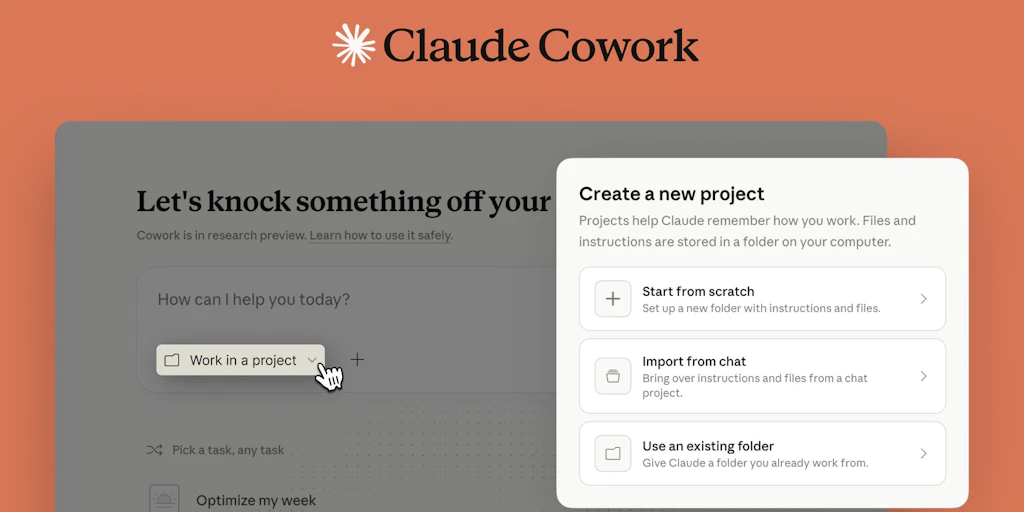
Foto: Product Hunt AI
Today, Claude Cowork Projects launches on the market — a project management tool that combines tasks, files, instructions and context in a single workspace. The desktop application is designed for individuals and teams working on complex workflows that require constant organization and repeatability. A key feature of the tool is storing all data locally, which ensures security and fast access. Cowork Projects allows maintaining consistent work context across all tasks, eliminating the need to switch between multiple applications. The solution falls into the productivity and task management category, fitting the trend of integrating AI with work organization tools. For users, this means the ability to manage complex projects more efficiently without information fragmentation. In an era when teams work remotely and asynchronously, a centralized workspace with local storage can significantly reduce the time needed for team knowledge synchronization and decrease errors resulting from data dispersal.
Anthropic has just introduced Claude Cowork Projects — a project management tool integrated directly with the AI assistant Claude. This is not just an ordinary task management application. It's about a fundamental change in how teams and individual users can organize work while maintaining context and continuity in complex workflows. In an era when most project management tools exist in the cloud and require synchronization between platforms, Cowork Projects does something different — moving the entire operation to the user's desktop and making it completely local.
This move is symptomatic of a broader trend in the AI industry: instead of building another SaaS platform with a browser-based interface, companies are beginning to understand that users want tools that live where they already work. Claude Cowork Projects combines task management, file handling, project instructions, and contextual memory in one coherent workspace. This changes the game for people dealing with complex workflows — from researchers and engineers to project managers and content creators.
Local Workspace Architecture — Why It Matters
Over the past decade, we've witnessed the migration of practically all business tools to the cloud. Asana, Monday.com, Jira — all operate in the browser, synchronize data on servers, and force work within their ecosystem. Claude Cowork Projects makes a decision going in the opposite direction: everything is stored locally on the user's desktop. This is not a marginal architectural choice — it has profound implications for privacy, performance, and how users can work.
Read also


Storing everything locally means that sensitive project information, business instructions, and even files containing client data never leave the user's computer. At a time when every major tech platform is under regulatory scrutiny and companies increasingly fear data breaches, this is significant. Users can work offline without worrying about synchronization or losing access. Performance is also higher — there's no waiting for network requests, no delays characteristic of web applications.
But there's also a deeper philosophy here. Anthropic positions this as a tool for people who must manage truly complex workflows — researchers, engineers, analysts. For these users, context is everything. You need to remember why you made a decision three weeks ago, what the constraints were, which files were relevant, what instructions guided your work. Claude Cowork Projects builds a structure around this kind of work, where every element — tasks, files, instructions, history — remains accessible and interconnected.
Integration with Claude — The Assistant as Part of Work Infrastructure
The key difference between Claude Cowork Projects and traditional project management tools is that Claude — the AI assistant — is not an add-on or integration. It is an integral part of the system itself. When you organize tasks, add files, write instructions, Claude has full access to this context and can use it for actual work.
This changes how you can work. Instead of opening Asana to check tasks and then opening Claude in a separate browser tab, everything is in one place. Claude understands the project, its goal, constraints, and progress so far. When you ask Claude for help with a task, the assistant already knows what it's about because it has access to the full project context. This eliminates the cycle: explaining the problem → waiting for an answer → copying the result back to your work tool.
The practical implications are significant. Imagine you're managing a research project with dozens of tasks, hundreds of files, and complex methodology instructions. In a traditional workflow, each interaction with Claude requires manually transferring context. In Cowork Projects, Claude already knows everything. You can ask for analysis, synthesis, report generation — all with full understanding of the project. This is not automation in the old sense; this is an assistant that truly understands your work.
Organizing Complex Workflows — Who This Is Really For
Anthropic clearly positions Cowork Projects for people and teams dealing with complex workflows. This is not for someone who has five simple tasks to complete. This is for a scientist who has a project with thousands of variables, for an engineer managing multiple branches of work, for a project manager with hundreds of dependencies, for a writer organizing research for a book.
For this kind of work, traditional project management tools are often too rigid. Asana enforces a specific structure. Jira is designed for engineering teams and doesn't always scale well to other types of work. Notion is flexible but requires a lot of manual configuration and doesn't have a built-in AI assistant that understands your project. Cowork Projects tries to find a middle ground — a flexible structure that organizes work without imposing rigid processes, with an AI assistant that actually has access to the entire context.
The structure consists of four main elements: tasks, files, instructions, and memory. Tasks are obviously what you need to do. Files are everything that's relevant — documents, data, results of previous work. Instructions are the rules, methodologies, guidelines that guide the work. Memory is the history — what you did, why you did it, what the results were. All of this is interconnected, so Claude can work with the full picture.
Reusability and Context Consistency — Building Workflows for Reuse
One of the most interesting features of Cowork Projects is the emphasis on reusability. It's not just about organizing your current project. It's about creating a structure you can reuse for future projects. If you work on a series of similar research projects, you can create a project template with appropriate instructions, file structure, and set of tasks. Next time, instead of starting from scratch, you load the template and you're ready to work.
This has real implications for productivity. Much knowledge work is repetitive — the same methodology, the same process, different data. Traditional project management tools support templates, but not the way Cowork Projects does. Here, the template contains not just structure, but also instructions for Claude on how to work on this type of project. So when you load the template, you don't just get a list of tasks — you get an AI assistant that is configured to work on this specific type of problem.
Context consistency is key here. In a traditional workflow, each new project means a new context for Claude — you have to explain from scratch what you're learning, what the rules are, what the constraints are. In Cowork Projects, if you use a template, Claude already knows. Instructions are built in. Memory from previous projects can be transferred. This means you can work faster and with fewer errors.
Implications for Teams — Collaboration in a Local Workspace
While Cowork Projects is described as a tool for individual users and teams, the local model raises interesting questions about collaboration. How do teams share projects if everything is stored locally? The answer is not yet entirely clear from available information, but one can infer that there will be some synchronization mechanisms — probably git-like, where each team member has a local copy of the project and can synchronize changes.
This has both advantages and disadvantages compared to traditional cloud-based tools. The advantage is that each team member has full control over their copy of the project and can work offline. The disadvantage is that synchronization can be more complicated than in cloud-based systems, where changes are immediately visible to everyone. For teams working in high-pressure conditions where every second counts, this could be a challenge.
But for many teams — especially those working on research, analysis, or complex technical projects — this model could actually be better. It allows for deep focus without distracting real-time notifications. It allows for offline work. It allows for full privacy. This might be exactly what teams doing sensitive work need.
Competition in the AI-Powered Project Management Space
Claude Cowork Projects enters a market that already has numerous players. Monday.com, Asana, Notion, Jira — all these tools now have AI integrations or built-in AI features. But none of them does what Cowork Projects does — doesn't integrate the AI assistant so deeply into the project management structure, doesn't store everything locally, doesn't build contextual memory in this way.
The closest competitor is probably Notion, which also allows flexible work organization and has AI integrations. But Notion is cloud-based, and its AI features are more supplementary than integral. Monday.com and Asana are more rigid in their structures, though more mature in their capabilities. Cowork Projects tries to find a niche — for people who want deep integration with AI, local control, and flexible structure.
This is not a game about capturing the entire project management market. This is a game about capturing a specific segment — people dealing with complex workflows who want an AI assistant that truly understands their project. For this segment, Cowork Projects could be a game changer.
Appropriation and the Future of Personal AI Tools
Cowork Projects is symptomatic of a broader trend in the AI industry. Instead of building massive platforms that try to be everything for everyone, companies like Anthropic are building tools that are deep and specialized. Instead of the cloud, they're building on the desktop. Instead of generalized assistants, they're building assistants that understand specific work contexts.
This is the future of personal AI tools — not as general assistants, but as specialists that are embedded in work infrastructure. Claude embedded in a text editor that understands the document you're working on. Claude embedded in a project management tool that understands your project. Claude embedded in a data analysis tool that understands your data. Every tool with an assistant that has full access to context and can work with complete understanding of what you're doing.
Cowork Projects is Anthropic's first serious step in this direction. This is not a project management tool with an AI add-on. This is a project management tool that is built around AI, where AI is not an add-on but the foundation. This is the future that Anthropic sees, and if it succeeds, other companies will follow.
More from Tech


Related Articles

After court loss, RFK Jr. gives himself more power over CDC vaccine panel
Apr 6
Steven Spielberg Still Wants to Make a Horror Film ‘Someday’
Apr 6New Jersey has no right to ban Kalshi's prediction market, US appeals court rules
Apr 6